
REALITY
To start with, we need to acknowledge Cadence Virtuoso designers (the ones that create “Virtuoso” for the world). They have a pretty good idea on what is going on with designers using their software. Over the last few decades, They have utilized the “Artificial Intelligence” language called “SKILL” to solve these issues uncovered by the marketplace. These algorithms have become incredibly accurate in predicting what the IC Layout Designers’ intentions are.
Now, and for the last 26 years, I have been an IC Layout team leader (and contributing team member) for dozens of products. Throughout all these projects, not one of them were scheduled for un-known IC Layout Design issues. How can you plan for what you don’t know? Even when detailed planning is involved, when a typical project design is “Launched”, what “Seems” like small issues with IC Layout & Verification are largely ignored at a high price.
IE: A early DRC test run produces an error that is considered invalid. The design leader determines this by asking the PDK rule development team if the rule is “Valid’ for this design. The PDK team, however, did not know at the time that it was valid. Three months later, when the layout is due for completion, this error becomes valid and there is are now thousands of individual edits required for one top level circuit.
For clarity sakes, please keep in mind, that examples like above, are not from lack of planning competence and can happen with all the phases of design. They stem from complexed issues involved with market plans, funding, creation of RTL (“Real Top Level”), silicon packaging, designated “Design” period, test plans, etc.. This is imbedded into the “Nature” of design cycles. Because new products require new ideas, new problems will be revealed.
So, the design cycle comes to a peak with multi-million-dollar mask orders on the horizon and all teams are excited. Suddenly, because X (meaning any anomaly) did not get completed properly, there are 200 hours of IC Layout work remaining. The work MUST be performed from high risk of failure. What makes it worse, is that the work must be performed serially by ONE layout designer at a time. Please remember this example may not be typical. But issues of many other sorts do occur on every design, causing the whole schedule to be at risk.
How To Make It Work
Now reality has set in. There is a huge IC Layout Design task to be performed. Eight layout designers are available, but your limited to one designer at a time. This is when Concurrent Layout will make the difference between meeting schedules or not. But how can you utilize this tool without failing from understanding its complexities? When a “Cell” is created in a Virtuoso for IC Layout, the cell view name is chosen by default to be “layout”.
So, a complexed top level type design cell, called “top_design” “layout” exists. It has either (or both), massive amounts of DRC errors or thousands of custom route connections. Here, I will attempt to simplify the process. Is steps.
Recommended Steps & Notes:
1)A properly trained and designated “Cell Manager” must be chosen. Any IC Layout Designer skilled in top-level integration would make a good candidate for training. In this training, you learn that the different roles to play when operating Concurrent Layout. Manager and Designer. This very important role is not just managing; but assisting all “Designers” in operating within the Concurrent Layout environment.
2)Then, the cell must be initialized. This step sets up a new database functionality that will be safely built into that layout cell view. Part of the initialization process, prompts the manager with the option to run the tool Cadence actually named “Sanity Checker”.
3)The first few terms to learn are “Master” and “Designer” modes. In the “Master” mode, no actual design editing can take place. The designers will not be able to edit their partitions. However, in the “Designer” mode, no partition management (or any other “Master” function) can take place.
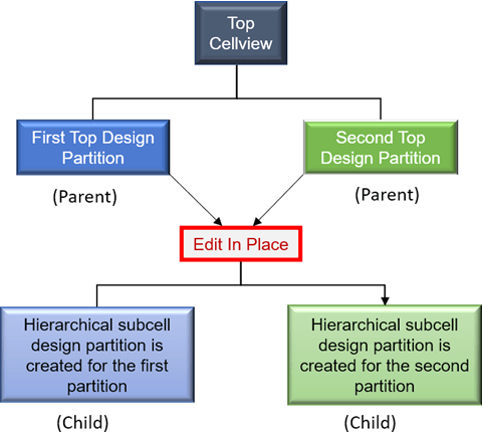
4)Create the layout “Partitions”. Virtuoso provides a tool for partitioning the layout work, in which a manager can create, modify or delete partitions. It is important to note, that after your partitions get edited, the tools will create (or re-use) cell views. By default, are called something like “layout_CL_part1” and “layout_CL_part2”. It would be advantageous to the manager if they took the time to name those partitioned layout views in accordance with the designated “Designers” who will be working on them.
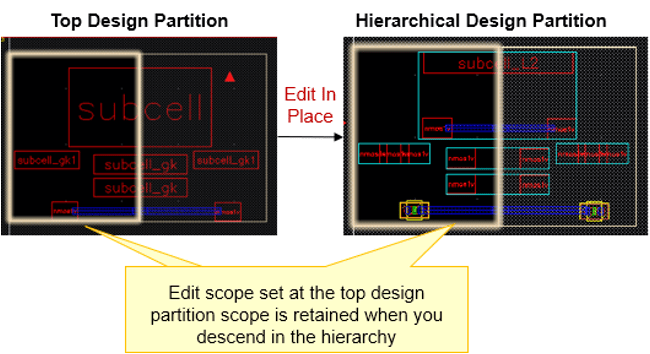
5) The slides below were from Cadence Design Systems website. Notice that Concurrent also manages the hierarchical edits within the partitions in the similar ways, as shown below.
Recommended Steps & Notes (part 2)
1)Understand file locking and version management within the latest Virtuoso. This is most important and avoids much confusion. Enovia’s “DesignSync” and Cliosoft’s “SOS” are very popular, but there are many others. I mention this because everyone needs to understand that these “Design Manager” software’s are CRITICAL for Concurrent layout operations. Virtuoso created an interface that is universal so that a typical designer can simplify “Checking In” and “Checking Out” file process. It is typically referred to as the Virtuoso “DM”.
2)The designated “Designers” do not use the normal means of “Checking In” and “Checking Out”. This cannot possibly be overstated. The Virtuoso Concurrent system will automatically “Check In” and “Check Out” as needed. Instead, they must use the “Submit For Merge/Recall” tool. 3)Once the design edits begin, there comes available a “Concurrent Layout” assistant. This assistant is setup for the individual designers using the Concurrent layout system. It features many abilities regarding object edit, creation and control. The “ALERTS” section, shows all violations. When an error occurs, it creates a unique marker object called a “GLYPH”. Alerts include putting work “Out Of Bounds” and other warnings. The “OBJECTS” section itemizes every rectangle, via, instance, group, etc. put into this layout partition. The section called “MODIFICATIONS” literally keeps track of all actual edit performed.
4)During the process of editing, a designer at anytime can run DRC from most any tool. This is performed through a “Virtual Memory Extraction” process.
5)Designer “Submits When the designer is ready to submit the design work, they use the “Merge” tool and submit for merge. Then, the master cell editor examines and then “Accepts” or “Rejects” the merge. The master cell editor can see the changes. They can perform VM DRC tests at that point without even saving the cell view. If they choose to reject the edits, the DM system will prompt for notes, explaining the rejection.
6)When the designers’ cells are accepted, the master cell editor can “Commit” to the partition changes. Like all other tasks, the Virtuoso DM Interface runs automatically in the background. Finally, the status in both the masters view and each partition shows “committed”, and the design is complete.
•In conclusion, one can admit that the task of managing might not equal the amount of work “Left to be done”. That decision remains fluid.•It is recommended that training should include some practice sessions with the teams should be performed before work gets started. Just a few hours up front will save many confusing hours in the schedule. Practice creating and editing partitions. Different scenarios should include:
•Edit layout partitions.
•View edits from master.
•Submit edits for merge.
•Reject edits.
•Run DRC from VM in Design and Master modes.
•Accept edits (commit)

 Simon IC Layout Design Services